> For the complete documentation index, see [llms.txt](https://learn.doubletick.io/llms.txt). Markdown versions of documentation pages are available by appending `.md` to page URLs; this page is available as [Markdown](https://learn.doubletick.io/bot-studio/actions/customer-management/how-to-use-assign-agent-action-component.md).
# How to use Assign Agent Action Component
In modern customer service and sales operations, efficiency and fair distribution of leads or inquiries are paramount.. This strategy is increasingly adopted by businesses to enhance team productivity and ensure that customers receive timely assistance.
**Functionality of the "Assign Agent" Node**
**Step 1. Choose assignment Method: Round Robin Assignment**
* **What It Does**:
* The node uses the Round Robin methodology to assign leads or queries to agents in a sequential order. For example, if there are four agents (A, B, C, D), the first lead is assigned to A, the second to B, and so on. Once the last agent (D) is assigned a lead, the process cycles back to the first agent (A).
* **Key Features**:
* **Fair Distribution**: Ensures all agents receive an equal share of leads, preventing overburdening or favoritism.
* **Automation**: The bot handles the assignment automatically, eliminating the need for manual intervention.
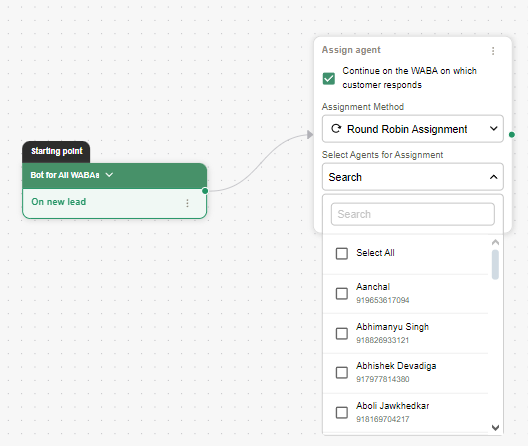
**Step 2. Select Agents for Assignment**
* **Agent Pool**:
* Administrators can define the list of agents eligible for assignment.
* Agents are listed with their names and contact details (e.g., phone numbers) for easy selection.
* **Custom Selection**:
* The administrator can:
* **Select All**: Include all listed agents in the Round Robin process.
* **Filter Specific Agents**: Use the search bar to find and include specific agents in the assignment pool.
* **Deselect Agents**: Exclude unavailable agents or those who should not participate in the workflow.
\
**Overview of the Workflow**
The workflow begins with a bot handling incoming leads or customer interactions across a unified communication platform. Once a new lead is identified, the bot automates the task assignment process using a Round Robin methodology.
Key features visible in the workflow include:
1. **Assignment Method**:
* The "Round Robin Assignment" logic ensures fair distribution of leads among agents.
* Agents are selected sequentially from a predefined list.
2. **Customizable Options**:
* Administrators can search for specific agents or select/deselect them from the assignment pool, tailoring the process to their needs.
3. **Continued Engagement**:
* An option to "Continue on the WA (WhatsApp Business Account) on which the customer responds" ensures personalized follow-up, enhancing the customer experience.
**Conclusion**
By leveraging bots, businesses can enhance efficiency, improve team morale through fair workload distribution, and deliver superior customer experiences. As automation continues to evolve, such systems will become an integral part of modern business operations.
---
# Agent Instructions
This documentation is published with GitBook. GitBook is the documentation platform designed so that both humans and AI agents can read, navigate, and reason over technical content effectively. Learn more at gitbook.com.
## Querying This Documentation
If you need additional information that is not directly available in this page, you can query the documentation by asking a question.
Perform an HTTP GET request on the following URL with the `ask` and `goal` query parameters:
```
GET https://learn.doubletick.io/bot-studio/actions/customer-management/how-to-use-assign-agent-action-component.md?ask=&goal=
```
`ask` is the immediate question: it should be specific, self-contained, and written in natural language.
`goal` is what the user is ultimately trying to achieve, the reason they need the answer. Sharing it helps GitBook give you a better, more relevant answer. A goal is most helpful when it describes the outcome the user wants rather than restating the question. For example, with `ask=how do I create an API token`, a goal like `automate deployments from our CI pipeline` lets GitBook tailor the answer to that use case.
The response will contain a direct answer to the question and relevant excerpts and sources from the documentation.
Use this mechanism when the answer is not explicitly present in the current page, you need clarification or additional context, or you want to retrieve related documentation sections.
.gif?alt=media&token=da39a4d2-2913-4e06-ad4f-5f4c4b7ca758)