> For the complete documentation index, see [llms.txt](https://learn.doubletick.io/llms.txt). Markdown versions of documentation pages are available by appending `.md` to page URLs; this page is available as [Markdown](https://learn.doubletick.io/bot-studio/triggers/on-sla-breached.md).
# On SLA breached
Learn how to use the On SLA breached trigger to automate escalations when response or resolution SLAs are violated.
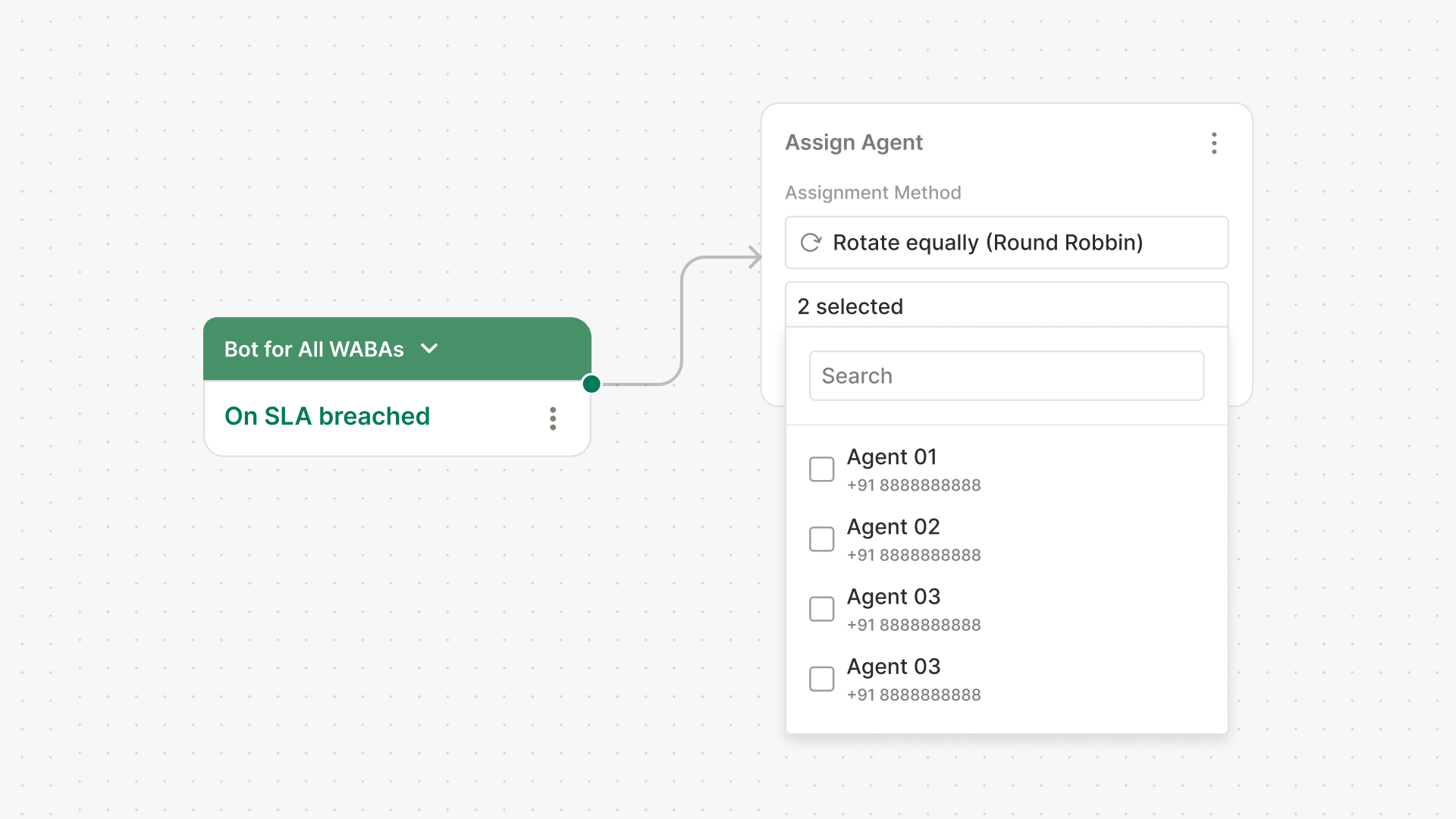
**On SLA breached** is a Bot Studio trigger. It activates when a configured **response** or **resolution SLA** is violated. An SLA defines how quickly your team must respond to or resolve a conversation. When that limit is crossed, the trigger starts an automated escalation journey.
Configure your SLAs before building this journey. See [What is an SLA and How to Set Up a Default SLA on DoubleTick](/settings/what-is-an-sla-and-how-to-set-up-a-default-sla-on-doubletick.md) for setup guidance.
#### What's covered
* [Where to use this trigger](#where-to-use-this-trigger)
* [How to use it in Bot Studio](#how-to-use-it-in-bot-studio)
* [Common automations using this trigger](#common-automations-using-this-trigger)
* [Key takeaways](#key-takeaways)
* [Frequently asked questions](#frequently-asked-questions)
* [Related articles](#related-articles)
#### Where to use this trigger
Use this trigger when your business has defined **response** or **resolution** time commitments:
* **Customer support** teams with strict response targets
* **Sales teams** handling high-intent leads
* **Success teams** managing onboarding or renewals
* Workflows where delayed replies impact the customer experience
It is especially useful in high-volume environments, where conversations can be missed or delayed.
#### How to use it in Bot Studio
1. Open **Bot Studio** in DoubleTick.
2. Create a journey or edit an existing one.
3. Select the **On SLA breached** trigger.
4. Add the actions that should run after an **SLA breach**.
5. Save and publish the journey.
The journey runs automatically whenever an SLA breach occurs. For channel-specific SLA escalation, see [How to configure and use Multi - Channel-Level SLA with Escalations](/settings/how-to-configure-and-use-multi-channel-level-sla-with-escalations.md).
#### Common automations using this trigger
Use this trigger to automate actions such as:
* Send an **apology** or **status update** to the customer.
* Reassign the chat to an available agent.
* Mark the conversation as **high priority**.
* Tag or escalate the chat for leadership attention.
These workflows reduce customer frustration and support timely follow-up.
For example, a support team has a **10-minute response SLA**. If a message remains unanswered beyond that limit, **On SLA breached** activates. The bot can send a customer update, escalate the chat to a supervisor, and mark it as **urgent**.
#### Key takeaways
* **On SLA breached** fires when a configured response or resolution SLA is violated.
* It automates escalation without manual monitoring.
* It supports reassignment, priority tagging, and customer updates.
* It is useful for high-volume support and sales environments.
#### Frequently asked questions
What causes On SLA breached to fire?
It fires when a configured **response** or **resolution SLA** is violated.
What actions can I automate when an SLA is breached?
You can send a customer update, reassign the chat, mark it **high priority**, or escalate it.
Which teams benefit most from this trigger?
**Support**, **sales**, and **success** teams benefit from automated SLA escalation.
Does this trigger replace manual supervisor monitoring?
It reduces manual monitoring by automatically flagging and escalating breaches. Teams can still review escalated chats.
#### Related articles
{% content-ref url="/spaces/53n17VnOICC1LtDqlENV/pages/6Nx0nj0xkvHXcTkAnpO9" %}
[What is an SLA and How to Set Up a Default SLA on DoubleTick](/settings/what-is-an-sla-and-how-to-set-up-a-default-sla-on-doubletick.md)
{% endcontent-ref %}
{% content-ref url="/spaces/53n17VnOICC1LtDqlENV/pages/R0gnLUZcgzRNj9CxOP9G" %}
[How to configure and use Multi - Channel-Level SLA with Escalations](/settings/how-to-configure-and-use-multi-channel-level-sla-with-escalations.md)
{% endcontent-ref %}
{% content-ref url="/spaces/53n17VnOICC1LtDqlENV/pages/AhGftFzZWFXWpyAC3Hzz" %}
[How to Use the Close Conversation Feature](/bot-studio/actions/customer-management/how-to-use-the-close-conversation-feature.md)
{% endcontent-ref %}
---
# Agent Instructions
This documentation is published with GitBook. GitBook is the documentation platform designed so that both humans and AI agents can read, navigate, and reason over technical content effectively. Learn more at gitbook.com.
## Querying This Documentation
If you need additional information that is not directly available in this page, you can query the documentation by asking a question.
Perform an HTTP GET request on the following URL with the `ask` and `goal` query parameters:
```
GET https://learn.doubletick.io/bot-studio/triggers/on-sla-breached.md?ask=&goal=
```
`ask` is the immediate question: it should be specific, self-contained, and written in natural language.
`goal` is what the user is ultimately trying to achieve, the reason they need the answer. Sharing it helps GitBook give you a better, more relevant answer. A goal is most helpful when it describes the outcome the user wants rather than restating the question. For example, with `ask=how do I create an API token`, a goal like `automate deployments from our CI pipeline` lets GitBook tailor the answer to that use case.
The response will contain a direct answer to the question and relevant excerpts and sources from the documentation.
Use this mechanism when the answer is not explicitly present in the current page, you need clarification or additional context, or you want to retrieve related documentation sections.