> For the complete documentation index, see [llms.txt](https://learn.doubletick.io/llms.txt). Markdown versions of documentation pages are available by appending `.md` to page URLs; this page is available as [Markdown](https://learn.doubletick.io/click-to-whatsapp/conversion-api/how-to-set-up-conversions-api-to-track-ctwa-conversions.md).
# How to set up Conversions API to track CTWA conversions
Learn how to set up the Conversions API (CAPI) on DoubleTick step by step, so your Click-to-WhatsApp ads report real results like qualified leads, purchases, and bookings to Meta.
This guide shows you how to send conversion events (like a qualified lead or a purchase) from DoubleTick to Meta, so your Click-to-WhatsApp (CTWA) ads report real outcomes. With this in place, Meta can optimise your ads better, and you can unlock Purchase-Optimised campaigns.
#### What's covered
* [Quick overview](#quick-overview)
* [Before you start](#before-you-start)
* [Confirm you are running CTWA ads](#confirm-you-are-running-ctwa-ads)
* [Define the conversion events you want to track](#define-the-conversion-events-you-want-to-track)
* [Build the lead qualification flow in DoubleTick](#build-the-lead-qualification-flow-in-doubletick)
* [Choose when to fire the purchase event](#choose-when-to-fire-the-purchase-event)
* [How to fire events from DoubleTick](#how-to-fire-events-from-doubletick)
* [Data needed for each event](#data-needed-for-each-event)
* [Set up your dashboard in Meta Ads Manager](#set-up-your-dashboard-in-meta-ads-manager)
* [Reach 100 purchase signals](#reach-100-purchase-signals)
* [Create a Purchase-Optimised campaign](#create-a-purchase-optimised-campaign)
* [Monitor, validate, and improve](#monitor-validate-and-improve)
* [Common blockers and fixes](#common-blockers-and-fixes)
* [Key takeaways](#key-takeaways)
#### Quick overview
The Conversions API (CAPI) connects results from WhatsApp (through DoubleTick) back to Meta. This way, Ads Manager shows which CTWA campaigns actually create value, not just clicks or chat starts.
#### Before you start
Make sure you have:
* Active CTWA campaigns running. Conversions API works only for CTWA.
* A DoubleTick account with admin access for your WhatsApp API number.
* A contact person at DoubleTick (onboarding or tech) who will receive the integration details.
* Written-down business decisions on what a lead and a purchase mean for your use case.
#### Confirm you are running CTWA ads
* In Ads Manager, check that your ads use **Click to WhatsApp** as the destination.
* If you are not running CTWA ads, set up CTWA campaigns first. CAPI won't accept leads that don't come from CTWA, and you will see a "Not a Click to WhatsApp customer" error.
#### Define the conversion events you want to track
Decide exactly which events you want to send to Meta. Typical events are:
* **Conversation Started**: People who clicked the ad and started a chat. This is already available.
* **Lead Submitted**: The user filled a form or answered qualification questions in the flow.
* **Purchase / Activity Completed**: An actual sale, booking, or activity, such as a store check-in or an appointment.
* **Purchase Intent**: Used when the actual purchase may happen later. This is useful when the time to conversion is more than 7 days.
Write down each definition in one line, so everyone agrees on what "Lead" or "Purchase" means.
#### Build the lead qualification flow in DoubleTick
* In **Bot Studio**, design a bot flow that captures a lead: name, phone, product interest, and a qualification flag (for example, `qualified = true`).
* Decide the exact point where a lead counts as "submitted". For example, when the user clicks Submit on a form, or reaches the final node of the qualification journey.
* Make sure the bot saves a custom contact field or tag when the lead is submitted (for example, `lead_status = submitted` or `lead_score = high`).
This matters because CAPI needs a clear point in the bot flow to fire the "Lead Submitted" event.
#### Choose when to fire the purchase event
The purchase event is the most important one. Meta needs about 100 Purchase signals before it allows Purchase-Optimised (PO) campaigns. Pick the strategy that fits your business:
| Situation | Time to convert | When to fire the event |
| ---------------------------------------------------------- | ---------------- | ------------------------------------------------------------------------- |
| Low-ticket direct online sales (immediate) | Less than 7 days | Fire on the actual sale (an automatic webhook when the order is placed) |
| High-ticket or long purchase cycle | More than 7 days | Fire on Purchase Intent (qualified intent in the chat) |
| Activities that lead to sales (store walk-in, appointment) | Less than 7 days | Fire on activity completion (for example, appointment booked or check-in) |
| Activities that lead to sales, but take longer | More than 7 days | Fire on Purchase Intent |
By default, Meta only credits an ad with a conversion if it happens within 7 days. For longer sales cycles, use intent events.
#### How to fire events from DoubleTick
You have three main ways to trigger a CAPI event from DoubleTick:
* **Automated webhook (preferred)**: When your flow reaches the purchase node (or your CRM receives a sale), an automated webhook sends the Purchase event to Meta. Work with the DoubleTick tech team to map the webhook details to Meta's CAPI format (event name, clid/click\_id, customer phone, timestamp, and value if relevant).
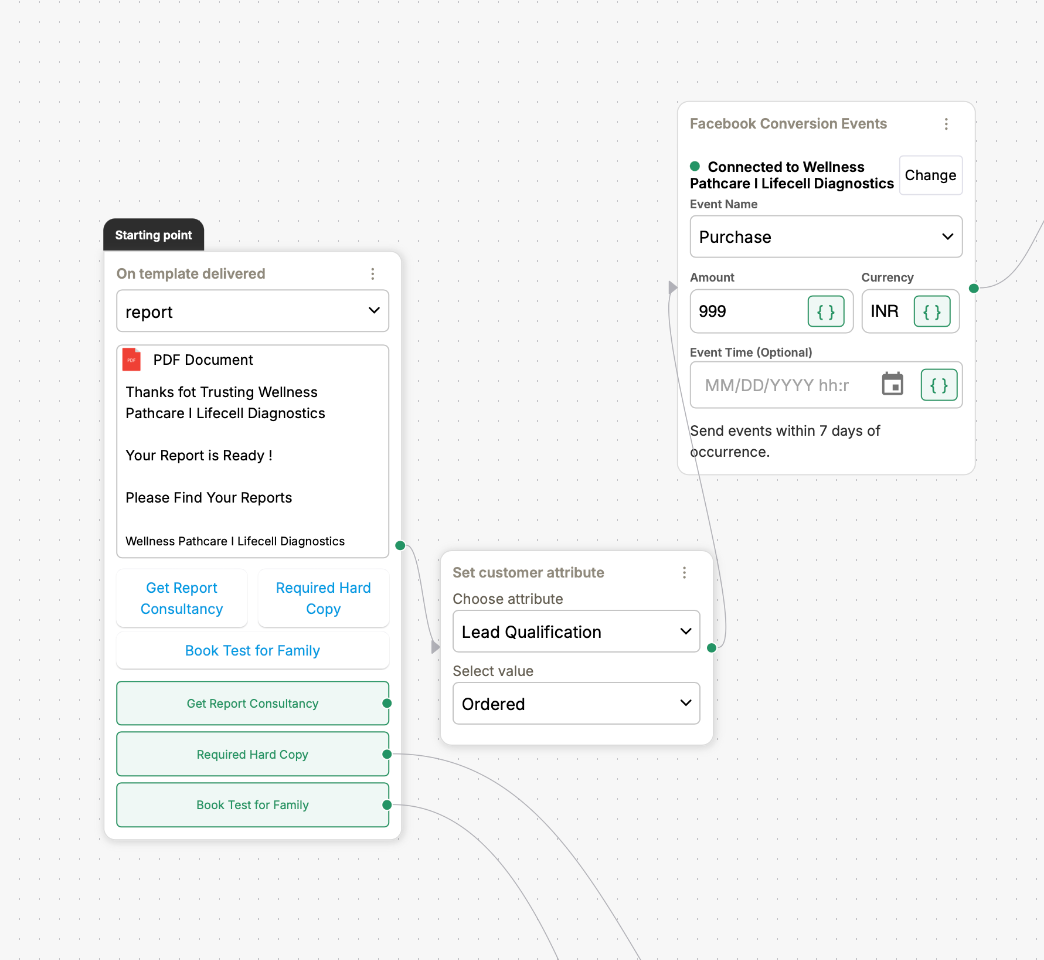
* **Template delivery or template-based confirmation**: If you send a transactional template after a payment (for example, "Thank you for your purchase"), set up DoubleTick to fire the Purchase event when that template is delivered. This is useful when your fulfilment system sends templates after payment confirmation.
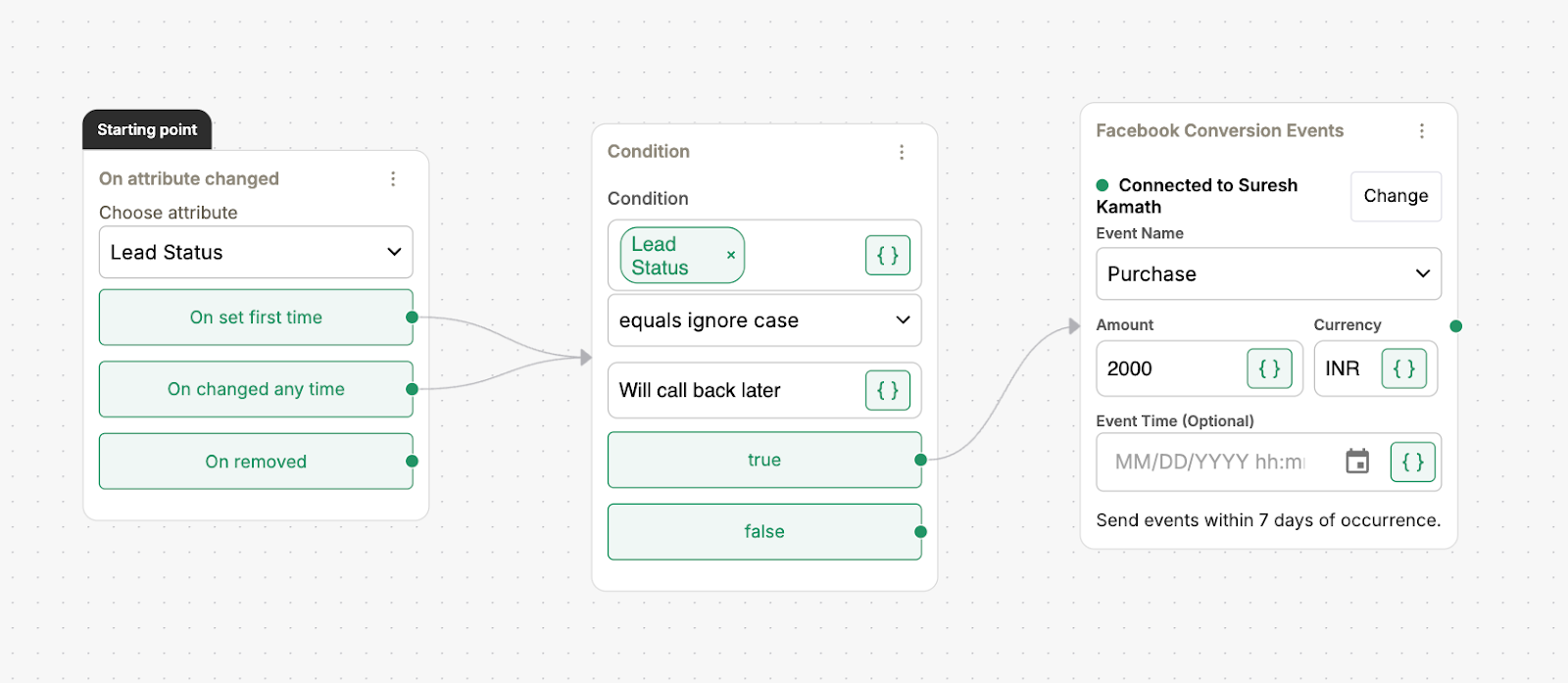
* **Manual or attribute-change trigger (fallback)**: If automation isn't possible, set the purchase event to fire when a contact attribute changes (for example, `order_status` changes to `paid`). This is manual, but fine for occasional workflows.
For any of these options, share the following with the DoubleTick tech team:
* Which events to send (Lead Submitted, Purchase, or Purchase Intent).
* The exact trigger point in your bot flow (screenshots or flow IDs).
* Example fields to send (phone, email, name, clid/click\_id, value, currency, and custom tags).
* How often you expect events, and how many.
#### Data needed for each event
Meta needs certain details to match and credit each event correctly. Include as many as you can. In order of priority:
* `clid` (Click ID): Essential for CTWA attribution. It is the unique ID that links a chat back to the ad click.
* `phone`: With country code.
* `email`: If available.
* `event_name`: For example, Purchase or Lead.
* `event_time`: As a Unix timestamp.
* `value` and `currency`: For purchases, if you want return on ad spend (ROAS).
* `user_agent` and `ip_address`: Optional.
* `custom_data`: For example, product\_id, order\_id, and tags.
DoubleTick helps you map these details into the CAPI payload. The Click ID (clid) is crucial. Without it, events can't be linked to the ad they came from.
#### Set up your dashboard in Meta Ads Manager
Set up Ads Manager so CAPI results are easy to read:
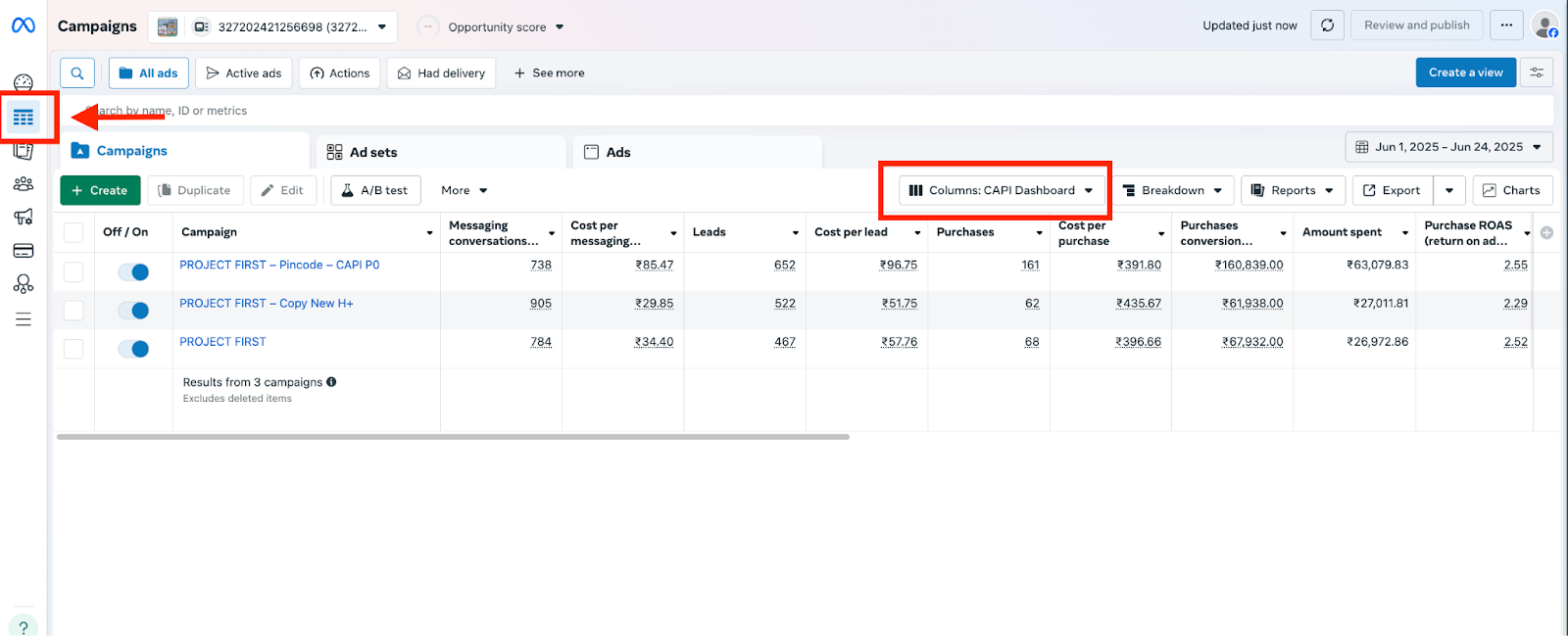
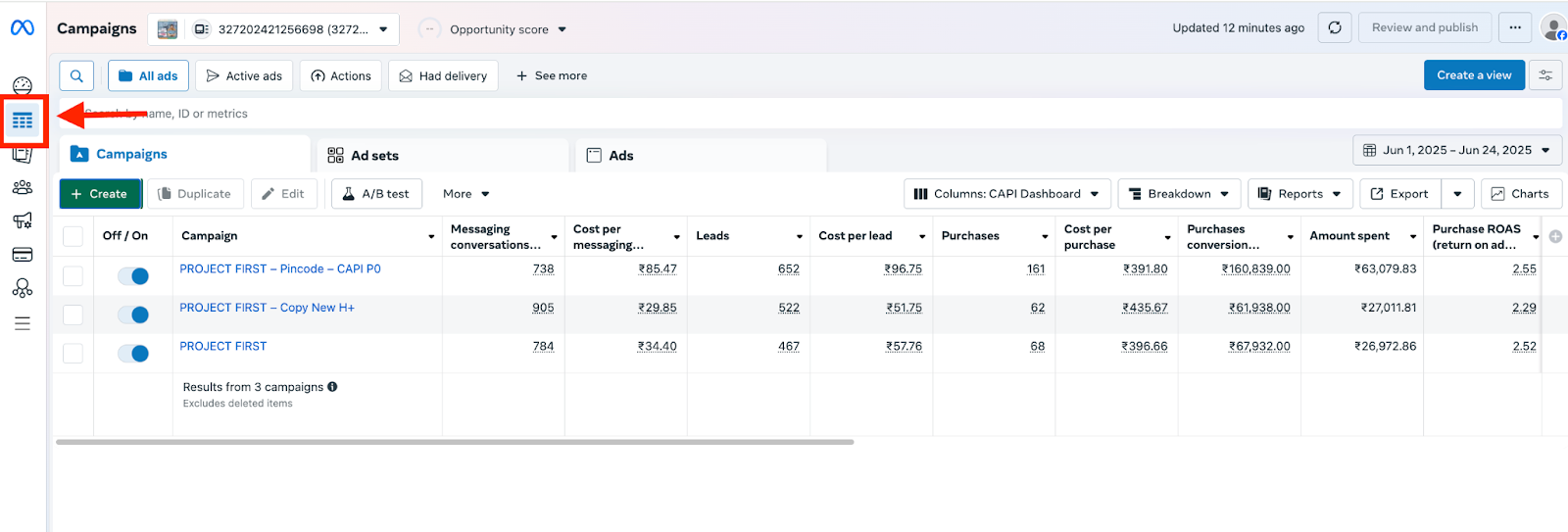
* Open **adsmanager.facebook.com** and go to **Campaigns**.
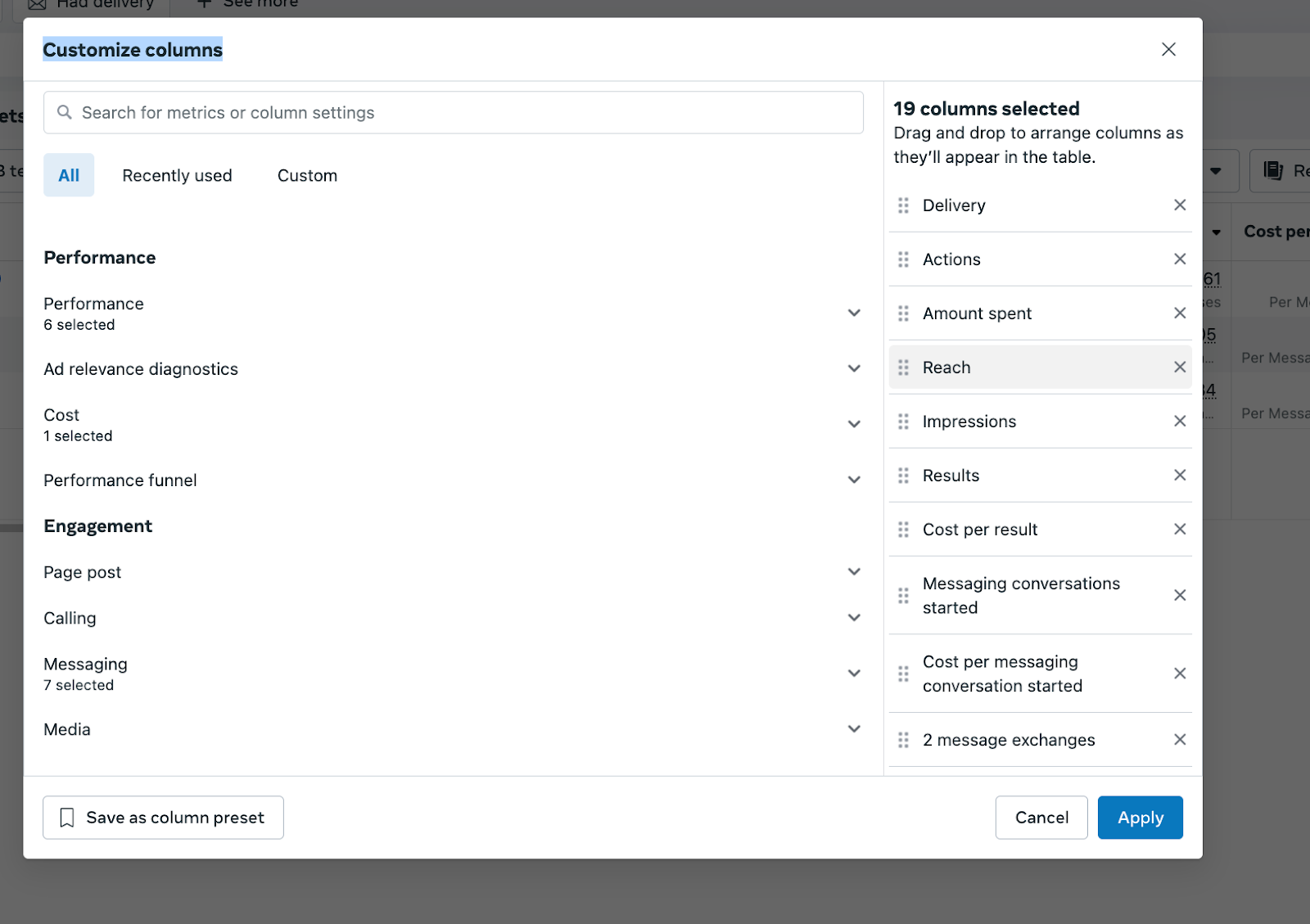
* Click **Columns**, then **Customize Columns**.
* Remove all the default columns on the right, then tick the following:
* Messaging Conversations Started
* Cost per Messaging Conversations
* Leads (uncheck Website and Meta Leads if you run CTWA only)
* Cost per Lead
* Purchases (uncheck Website and Meta Purchases if you run CTWA only)
* Cost per Purchase
* Purchase Conversion Value (accurate only if you pass `value`)
* Amount Spent
* Purchase ROAS (if you pass `value`)
* Reach
* Impressions
* Click **Save as Column Preset** and name it **CAPI Metrics**.
This preset shows your CTWA performance with CAPI events clearly.
#### Reach 100 purchase signals
Meta needs about 100 purchase signals to unlock Purchase-Optimised campaigns. You can check your signal count in two ways:
* **Kanban or CRM view in DoubleTick**: Use your kanban or pipeline and check the counter next to the custom field that tracks Purchases. This is an easy internal check.
* **Meta Ads Manager**: Once 100 signals are received, the option to create a Purchase-Optimised campaign appears in Ads Manager (check the Conversion objective options and conversion settings). The DoubleTick tech team can also help you verify this in the Events Manager or Conversions API dashboard.
Keep tracking your progress in the kanban and compare dates to make sure the signals are coming from your CTWA flow.
#### Create a Purchase-Optimised campaign
Once you have confirmed 100 purchase signals:
* Go to **ads.facebook.com** and sign in.
* Select the ad account that runs your CTWA campaigns.
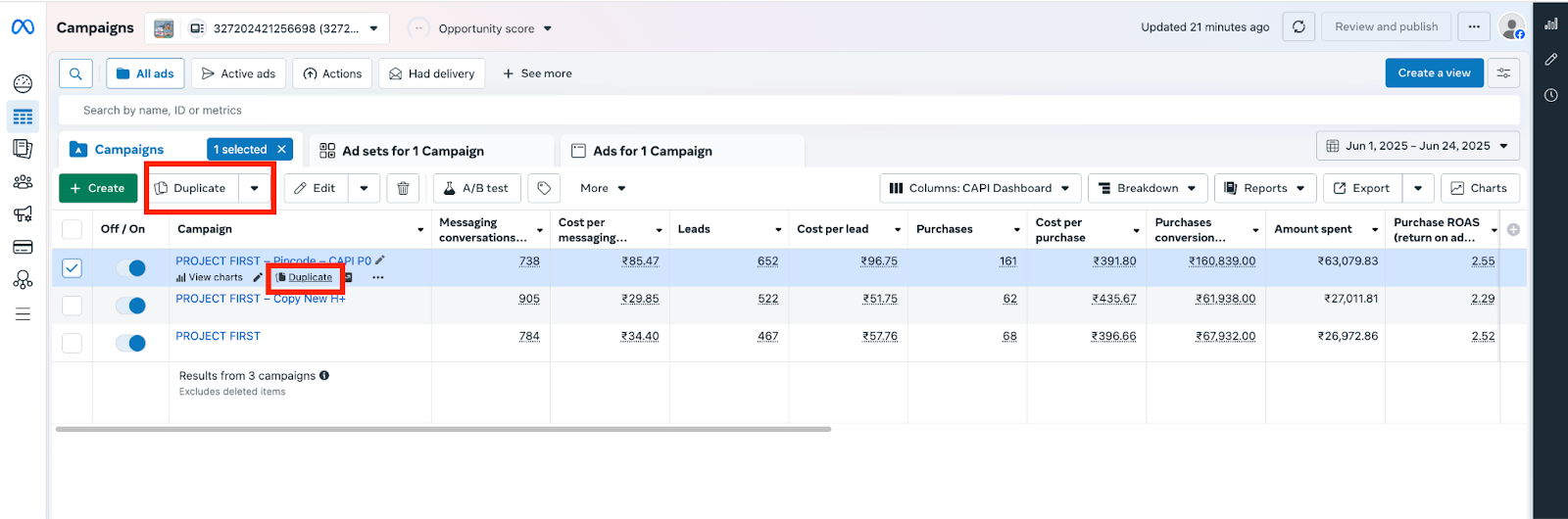
* Find your best-performing CTWA campaign (the one with the most Messaging Conversations or conversion signals).
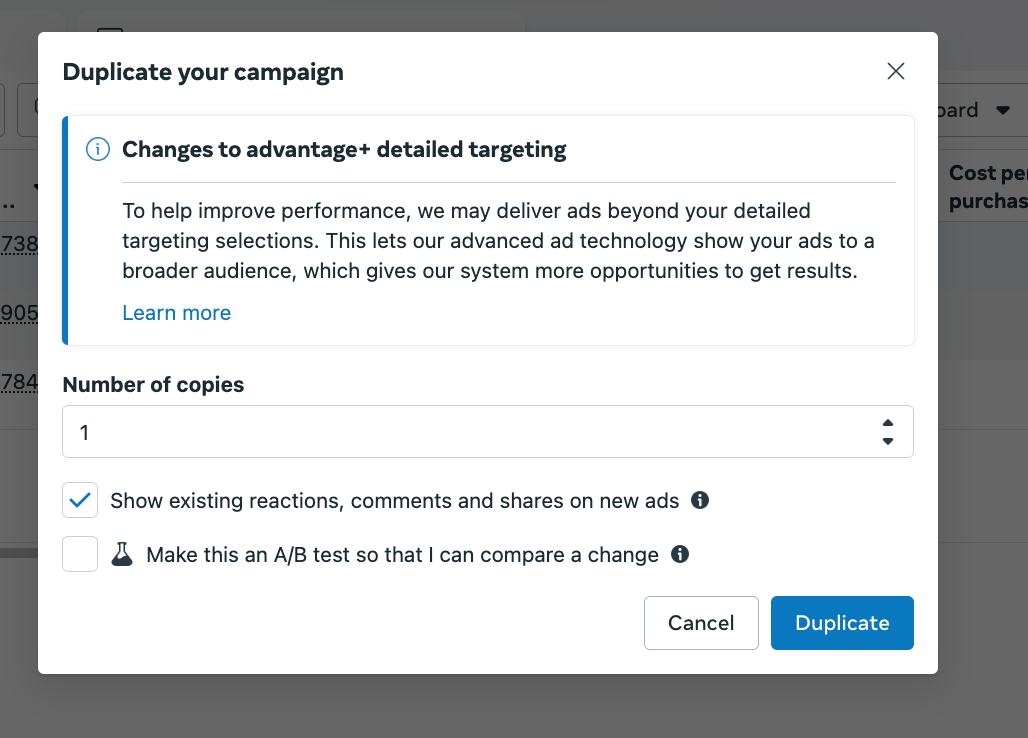
* **Duplicate** that campaign: select it, click Duplicate, and keep the number of copies at 1.
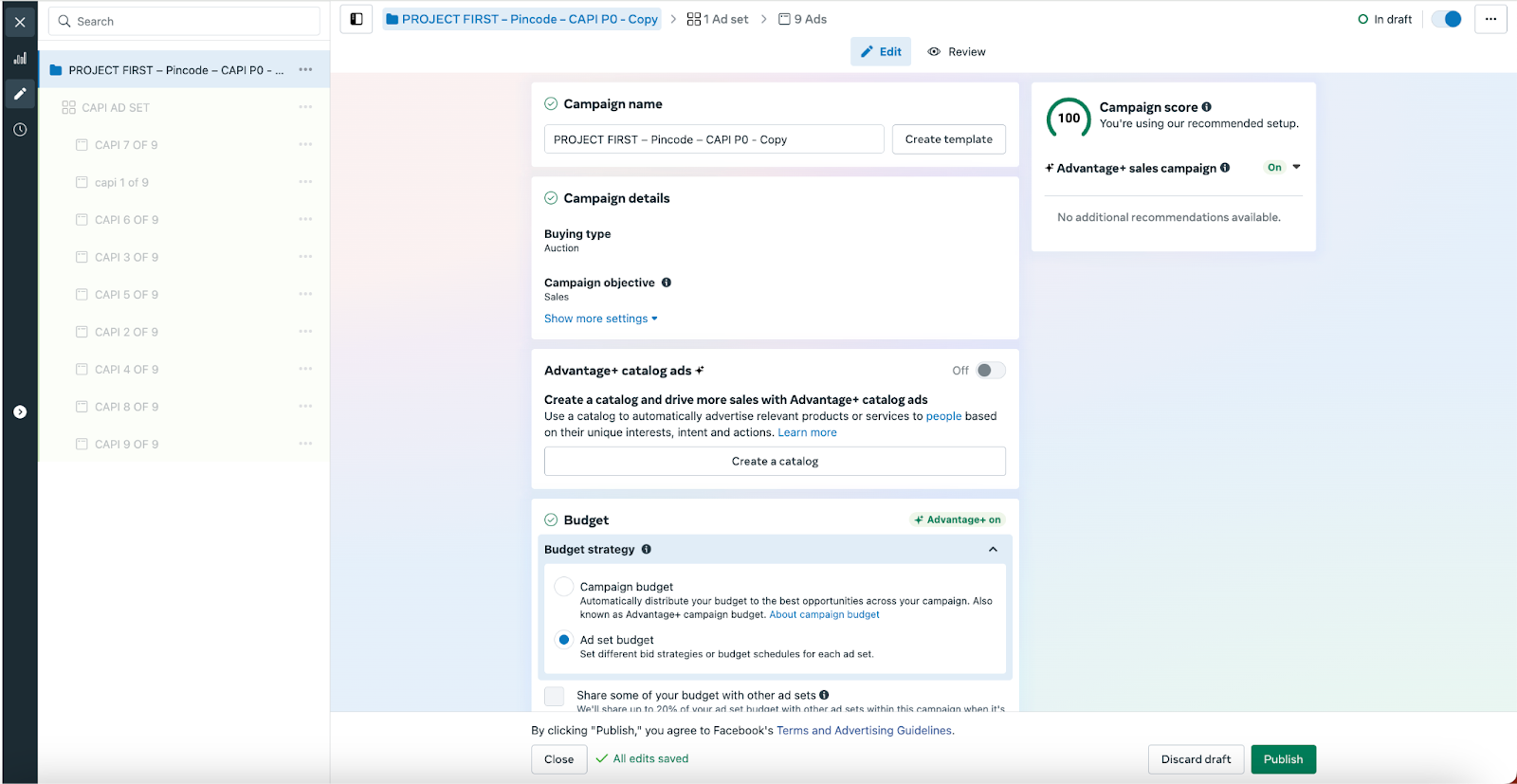
* In the new campaign name, add **CAPI** so you can identify it.
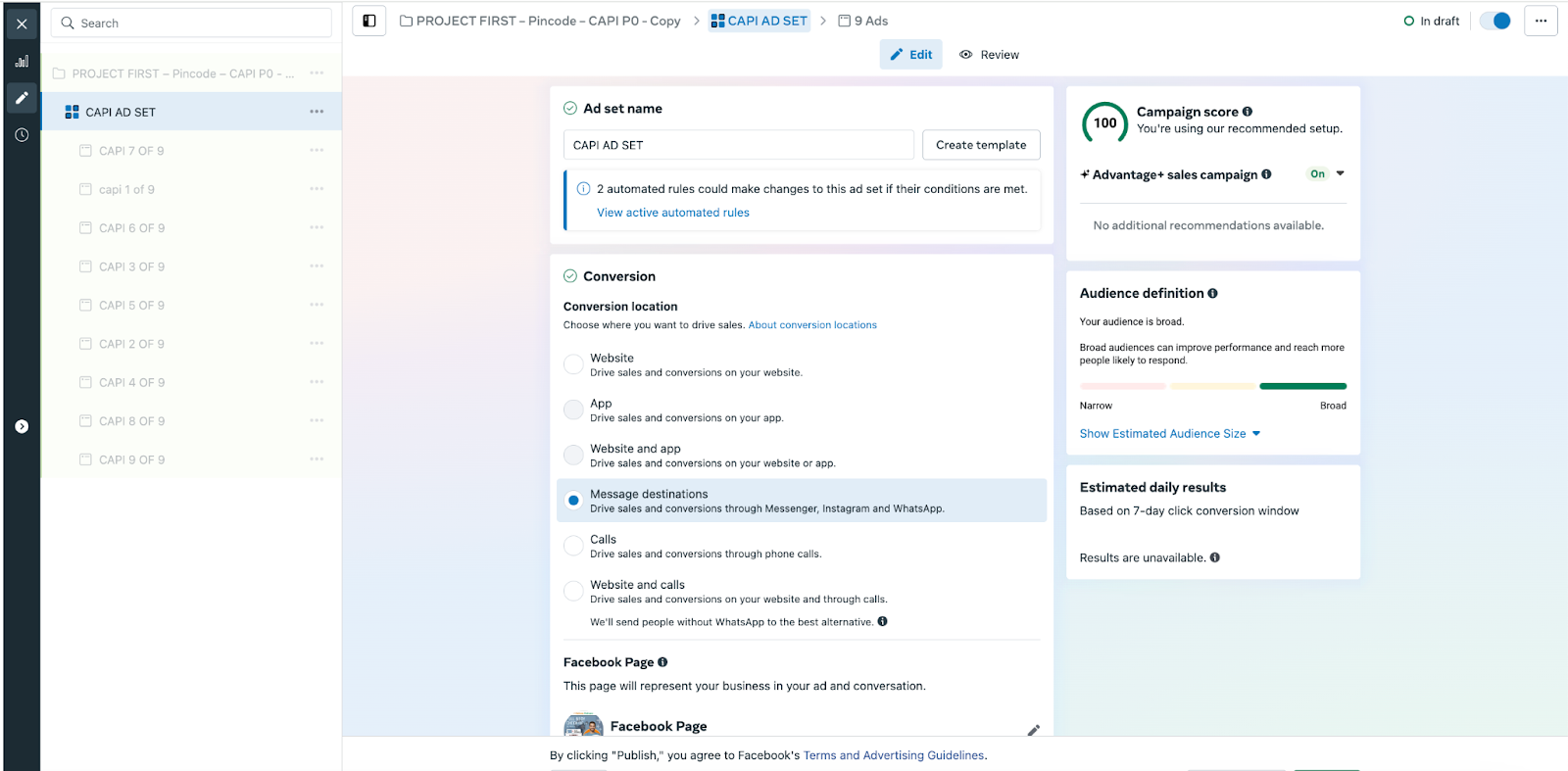
* At the ad set level, set **Conversion Location** to **Message Destinations**.
* Under **Placements**, keep WhatsApp checked and make sure your **API Number** (your WhatsApp API number) is selected.
* Under **Budget & Schedule**, choose **Lifetime Budget**. Calculate your budget as 100 × your average cost per purchase (from your previous campaigns). For example, if your average cost per purchase is INR 2,000, your budget is 100 × 2,000 = INR 200,000 for 14 days. For longer runs, adjust the budget in proportion.
* Under **Ad Settings**, ask the customer to upload creatives. Don't change other settings unless needed.
* Publish the campaign.
DoubleTick can help you pick the correct phone number and check that your conversion events are mapped correctly.
#### Monitor, validate, and improve
* Watch the CAPI Metrics columns in Ads Manager, and check Events Manager for incoming CAPI events.
* Check that events show the correct `event_name` and `value`, and that they are credited to the right campaigns.
* If conversions are lower than expected, check the `clid` in your event data. A missing Click ID is a common cause.
* If Purchase ROAS shows strange values, make sure `value` and `currency` are being sent correctly.
#### Common blockers and fixes
* **Missing Click ID (clid)**: Events won't link to the CTWA ad. Make sure the clid is captured when the user clicks the ad and is passed in the CAPI event data.
* **Conversions outside the 7-day window**: For long sales cycles, consider firing Purchase Intent instead of the actual Purchase.
* **Not reaching 100 purchase signals**: Increase your budget or broaden your audience to collect signals faster, or use Purchase Intent to help the first round of optimisation.
* **Duplicate events**: Use `event_id` to remove duplicates, or check timestamps so events aren't counted twice.
* **Token or authorisation failure**: Make sure the CAPI token you gave DoubleTick is valid and hasn't expired.
If you see a Facebook Conversion Events error in your bot, see the Troubleshooting section below.
#### Example event mapping
Here are two simple examples. Share similar examples with your DoubleTick technical contact for mapping.
**Lead Submitted**
```json
{
"event_name": "Lead",
"event_time": 1680000000,
"clid": "ABCD1234",
"phone": "+919876543210",
"email": "user@example.com",
"custom_data": {"lead_score":"high"}
}
```
**Purchase**
```json
{
"event_name": "Purchase",
"event_time": 1680003600,
"clid": "ABCD1234",
"phone": "+919876543210",
"value": 2500,
"currency": "INR",
"order_id": "ORD12345"
}
```
#### Quick checklist
Share this with your operations person:
* [ ] Confirm CTWA campaigns are active.
* [ ] Define Lead and Purchase events clearly, and document them.
* [ ] Build the qualification and purchase nodes in the bot flow, and mark the trigger points.
* [ ] Decide how to fire events (an automated webhook is preferred).
* [ ] Share the required fields (clid, phone, value) with the DoubleTick team.
* [ ] Set up Ads Manager columns and save them as "CAPI Metrics".
* [ ] Track progress to 100 Purchase signals (kanban and Events Manager).
* [ ] Duplicate your best CTWA campaign, set Conversion Location to Message Destinations, add "CAPI" to the name, and set a lifetime budget of 100 × average cost per purchase.
* [ ] Monitor and optimise.
#### Best practices and tips
* Capture `clid` reliably at the moment the user clicks the CTWA ad. It is the backbone of attribution.
* Send `value` for purchases if you want accurate ROAS and Purchase Conversion Value.
* Prefer automated webhook triggers for real-time, reliable event firing.
* Use Purchase Intent events for long sales cycles, then switch to actual Purchase events when they are available.
* Test your events with a small test ad to check the mapping before you scale.
#### Key takeaways
* CAPI sends real outcomes like leads and purchases from DoubleTick to Meta, so Ads Manager shows which CTWA campaigns create value.
* It works only for CTWA campaigns, and every event needs the Click ID (clid) to be linked to the right ad.
* Define what a Lead and a Purchase mean for your business before you build anything.
* Use an automated webhook to fire events whenever you can. Use Purchase Intent for sales cycles longer than 7 days.
* Meta needs about 100 Purchase signals before you can create a Purchase-Optimised campaign.
* After that, duplicate your best CTWA campaign, name it with "CAPI", and set a lifetime budget of 100 × your average cost per purchase.
* If your bot shows a Facebook Conversion Events error, connect your dataset or pixel to your ad account in Meta Business Settings. You need Admin or the right access on Business Manager to do this.
#### Frequently asked questions
Does Conversions API work for ads that are not Click-to-WhatsApp?
No. CAPI works only for CTWA ads. If a lead doesn't come from a CTWA ad, you will see a "Not a Click to WhatsApp customer" error.
What is the Click ID (clid) and why does it matter?
The Click ID is the unique ID that links a chat back to the ad click. Without it, events can't be linked to the ad they came from, so conversions will look lower than they really are.
How many purchase signals do I need for a Purchase-Optimised campaign?
About 100. Once Meta receives them, the option to create a Purchase-Optimised campaign appears in Ads Manager.
What if my customers take more than 7 days to buy?
Meta only credits an ad with a conversion that happens within 7 days by default. For longer sales cycles, fire the Purchase Intent event instead of the actual Purchase.
Which way of firing events should I use?
An automated webhook is preferred, because it fires events in real time and is more reliable. If you send a transactional template after payment, you can fire the event when the template is delivered. If automation isn't possible, you can fire the event when a contact attribute changes.
How do I check how many purchase signals I have?
Check the counter next to your Purchases custom field in your DoubleTick kanban or pipeline, or look in Meta Ads Manager. The DoubleTick tech team can also help you verify in Events Manager.
Why does my Purchase ROAS look wrong?
Check that `value` and `currency` are being sent correctly with each purchase event. ROAS is accurate only if you pass the purchase value.
What does the Facebook Conversion Events error mean?
It means your bot tried to send a Purchase or Lead Submitted event to Facebook, but Facebook said the object (dataset or pixel) does not exist or you don't have permission to use it.
How do I fix the Facebook Conversion Events error?
In Meta Business Settings, go to Data sources, then Datasets and Pixels. Open your dataset, select Connected assets, and connect your ad account. If you still see the error, wait 5 to 15 minutes and test again, and check that the Object ID in the error matches the dataset or pixel you connected.
I can't see my ad account when connecting the dataset. What should I do?
Your ad account might be in a different Business Manager, or you might not have permission. Ask your Business Admin to add the ad account or give you access.
#### Related articles
{% content-ref url="/spaces/53n17VnOICC1LtDqlENV/pages/mqt97hZ8HZSjYJodwGx9" %}
[How to fix Facebook conversion event error](/click-to-whatsapp/conversion-api/how-to-fix-facebook-conversion-event-error.md)
{% endcontent-ref %}
{% content-ref url="/spaces/53n17VnOICC1LtDqlENV/pages/KUGuRdyAXCLyNn76LWHJ" %}
[Getting started with Click-to-WhatsApp (CTWA) ads](/click-to-whatsapp/ctwa/getting-started-with-click-to-whatsapp-ctwa-ads.md)
{% endcontent-ref %}
---
# Agent Instructions
This documentation is published with GitBook. GitBook is the documentation platform designed so that both humans and AI agents can read, navigate, and reason over technical content effectively. Learn more at gitbook.com.
## Querying This Documentation
If you need additional information that is not directly available in this page, you can query the documentation by asking a question.
Perform an HTTP GET request on the following URL with the `ask` and `goal` query parameters:
```
GET https://learn.doubletick.io/click-to-whatsapp/conversion-api/how-to-set-up-conversions-api-to-track-ctwa-conversions.md?ask=&goal=
```
`ask` is the immediate question: it should be specific, self-contained, and written in natural language.
`goal` is what the user is ultimately trying to achieve, the reason they need the answer. Sharing it helps GitBook give you a better, more relevant answer. A goal is most helpful when it describes the outcome the user wants rather than restating the question. For example, with `ask=how do I create an API token`, a goal like `automate deployments from our CI pipeline` lets GitBook tailor the answer to that use case.
The response will contain a direct answer to the question and relevant excerpts and sources from the documentation.
Use this mechanism when the answer is not explicitly present in the current page, you need clarification or additional context, or you want to retrieve related documentation sections.