> For the complete documentation index, see [llms.txt](https://learn.doubletick.io/llms.txt). Markdown versions of documentation pages are available by appending `.md` to page URLs; this page is available as [Markdown](https://learn.doubletick.io/meta-business-setup/display-name/display-name-guide.md).
# Display name guide
Learn what a WhatsApp Display Name is, who controls and approves it, and why getting it right matters for your business
A quick guide to what a WhatsApp Display Name is, who controls it, and why getting it right matters for your business.
#### What's covered
* [What is a display name](#what-is-a-display-name)
* [Where is the display name used](#where-is-the-display-name-used)
* [Who controls the display name](#who-controls-the-display-name)
* [Why is the display name important](#why-is-the-display-name-important)
* [Display name vs business name](#display-name-vs-business-name)
* [When is a display name reviewed](#when-is-a-display-name-reviewed)
#### What is a display name
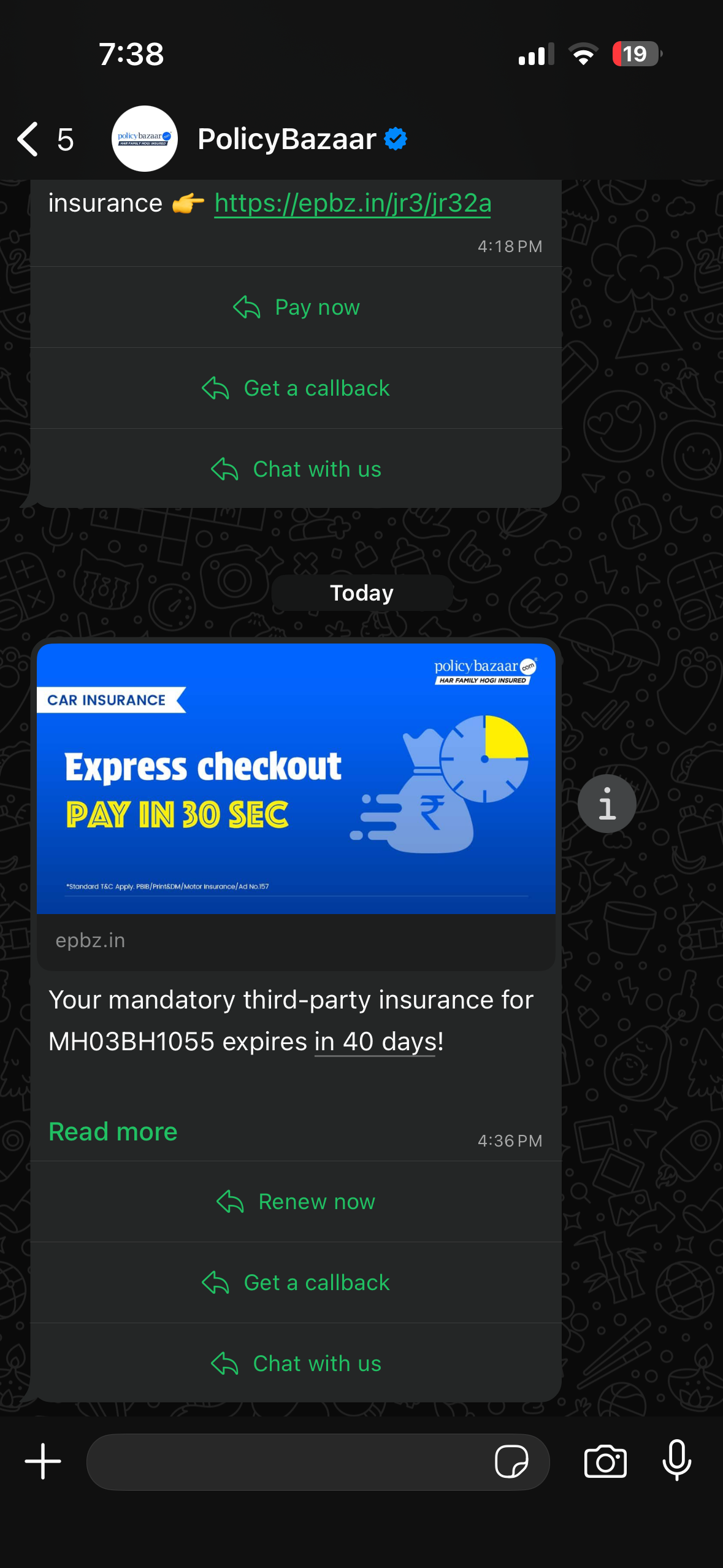
A **Display Name** is the business name that appears to end users on WhatsApp when they receive a message from a WhatsApp Business API number.
It's the name customers see:
* at the top of the WhatsApp chat
* in message notifications
* on the WhatsApp Business profile
For example, if a business is called *Fresh Produce Cold Pressed Juices*, that's the name users will see when they receive a WhatsApp message from that business.
**Key takeaways**
* A Display Name is the business name customers see on WhatsApp.
* It appears in chats, notifications, and your business profile.
**FAQs**
**Is a Display Name the same as my phone number?**\
No. Your phone number identifies the account. Your Display Name identifies your business.
**Will customers see my Display Name before opening a chat?**\
Yes. It can appear in message notifications and the chat list.
#### Where is the display name used
A Display Name is linked to a specific phone number inside a **WhatsApp Business Account** (WABA). Each phone number connected via DoubleTick must have one Display Name, and that name is visible to all end users interacting with the business.
**Key takeaways**
* Each WhatsApp API phone number has its own Display Name.
* Customers interacting with that number can see its Display Name.
**FAQs**
**Can one WABA have several Display Names?**\
Yes. Each phone number in the WABA can have a different Display Name.
**Can a phone number work without a Display Name?**\
No. Every phone number connected through DoubleTick needs one.
#### Who controls the display name
Although DoubleTick helps you onboard and manage the WhatsApp Business Platform, **Display Names are controlled and approved by Meta**. The Display Name is:
* submitted via Facebook Business Manager
* reviewed by Meta
* approved or rejected based on official policies
{% hint style="info" %}
Neither DoubleTick nor its BSP can override Meta's decision on your Display Name.
{% endhint %}
**Key takeaways**
* Meta reviews every submitted Display Name.
* DoubleTick helps you access the submission flow.
* Neither DoubleTick nor its BSP can override Meta’s decision.
**FAQs**
**Can DoubleTick approve my Display Name?**\
No. Meta alone approves or rejects Display Names.
**Where is a Display Name submitted?**\
You submit it through Meta’s business tools.
#### Why is the display name important
The Display Name plays a critical role in:
* building trust with customers
* clearly identifying who is messaging the user
* preventing spam, impersonation, and fraud
A clear and correct Display Name improves message open rates, customer confidence, and overall WhatsApp engagement.
**Key takeaways**
* A clear Display Name helps customers recognize your business.
* It supports trust and reduces confusion with spam or impersonation.
**FAQs**
**Does a Display Name affect customer trust?**\
Yes. A recognizable and accurate name helps customers identify your business.
**Can a poor Display Name affect engagement?**\
Yes. Customers may ignore messages from names they do not recognize.
#### Display name vs business name
It's useful to know upfront that the Display Name isn't always the legal company name, but it must be clearly connected to the legal business identity. For example:
* Legal name: *Fresh Produce Foods Private Limited*
* Display Name: *Fresh Produce Cold Pressed Juices*
As long as the connection is visible on the company's website or branding, this is acceptable. For the full set of rules Meta uses to judge this, check out [Display Name Guidelines for WhatsApp Business Platform](/meta-business-setup/display-name/whatsapp-business-display-name-guidelines.md).
**Key takeaways**
* Your Display Name can differ from your legal business name.
* The relationship must be clear on your website or other branding.
**FAQs**
**Can I use my brand name as a Display Name?**\
Yes, if your external branding clearly connects it to your legal business.
**What proves the connection to my legal business?**\
Your website, business documents, and consistent public branding can support it.
#### When is a display name reviewed
A Display Name goes through review when:
* a new phone number is added
* the Display Name is edited or changed
* a previously rejected name is resubmitted
The review is done entirely by Meta and usually takes 24–48 hours. If yours gets rejected, you can appeal it — see [How to Appeal for a Rejected Display Name](/meta-business-setup/display-name/how-to-appeal-for-a-rejected-display-name.md).
**Key takeaways**
* Meta reviews new, changed, and resubmitted Display Names.
* Reviews usually take 24–48 hours.
* You can appeal a rejection when the name meets the guidelines.
**FAQs**
**When does Meta review a Display Name?**\
Meta reviews it after you add, change, or resubmit a name.
**What should I do after a rejection?**\
Review the guidelines, then appeal if the name meets them.
#### Key takeaways
* A Display Name is your customer-facing business identity on WhatsApp
* Each phone number gets one Display Name
* Approval is mandatory before messaging can start
* Meta is the final authority on approval or rejection
* Your external branding (website, documents) must support the name
#### FAQs
**Does my Display Name have to exactly match my legal company name?**\
No. It just needs to be clearly connected to your legal business identity, for example through your website or other branding.
**Who approves my Display Name?**\
Meta reviews and approves every Display Name. DoubleTick and your BSP cannot override Meta's decision.
**How long does Display Name review usually take?**\
Typically 24–48 hours, though it can vary depending on Meta's review queue.
**Can each phone number have a different Display Name?**\
Yes, every phone number in your WABA has its own Display Name, though it should still represent the same business consistently.
**What if my Display Name gets rejected?**\
You can appeal if you believe it follows Meta's guidelines. See [How to Appeal for a Rejected Display Name](/meta-business-setup/display-name/how-to-appeal-for-a-rejected-display-name.md).
#### Related topics
* [WhatsApp business display name guidelines](/meta-business-setup/display-name/whatsapp-business-display-name-guidelines.md)
* [How to change your display name](/meta-business-setup/display-name/how-to-change-your-display-name.md)
* [How to appeal for a rejected display name](/meta-business-setup/display-name/how-to-appeal-for-a-rejected-display-name.md)
---
# Agent Instructions
This documentation is published with GitBook. GitBook is the documentation platform designed so that both humans and AI agents can read, navigate, and reason over technical content effectively. Learn more at gitbook.com.
## Querying This Documentation
If you need additional information that is not directly available in this page, you can query the documentation by asking a question.
Perform an HTTP GET request on the following URL with the `ask` and `goal` query parameters:
```
GET https://learn.doubletick.io/meta-business-setup/display-name/display-name-guide.md?ask=&goal=
```
`ask` is the immediate question: it should be specific, self-contained, and written in natural language.
`goal` is what the user is ultimately trying to achieve, the reason they need the answer. Sharing it helps GitBook give you a better, more relevant answer. A goal is most helpful when it describes the outcome the user wants rather than restating the question. For example, with `ask=how do I create an API token`, a goal like `automate deployments from our CI pipeline` lets GitBook tailor the answer to that use case.
The response will contain a direct answer to the question and relevant excerpts and sources from the documentation.
Use this mechanism when the answer is not explicitly present in the current page, you need clarification or additional context, or you want to retrieve related documentation sections.