> For the complete documentation index, see [llms.txt](https://learn.doubletick.io/llms.txt). Markdown versions of documentation pages are available by appending `.md` to page URLs; this page is available as [Markdown](https://learn.doubletick.io/meta-business-setup/official-business-accounts-blue-badge/oba-guide.md).
# OBA guide
Learn what an Official Business Account (OBA) is, what the blue checkmark actually means, and why it's a trust badge rather than a requirement for using WhatsApp.
An Official Business Account (OBA) is WhatsApp's blue-checkmark verification for authentic, well-known brands. This guide explains what it is, what it actually changes (and doesn't), and why Meta offers it.
#### What's covered
* [What is an Official Business Account (OBA)](#what-is-an-official-business-account-oba)
* [What does the blue checkmark actually mean?](#what-does-the-blue-checkmark-actually-mean)
* [How is OBA different from a regular business account?](#how-is-oba-different-from-a-regular-business-account)
* [Why does WhatsApp offer OBA?](#why-does-whatsapp-offer-oba)
* [Important things to understand about OBA](#important-things-to-understand-about-oba)
#### What is an Official Business Account (OBA)?
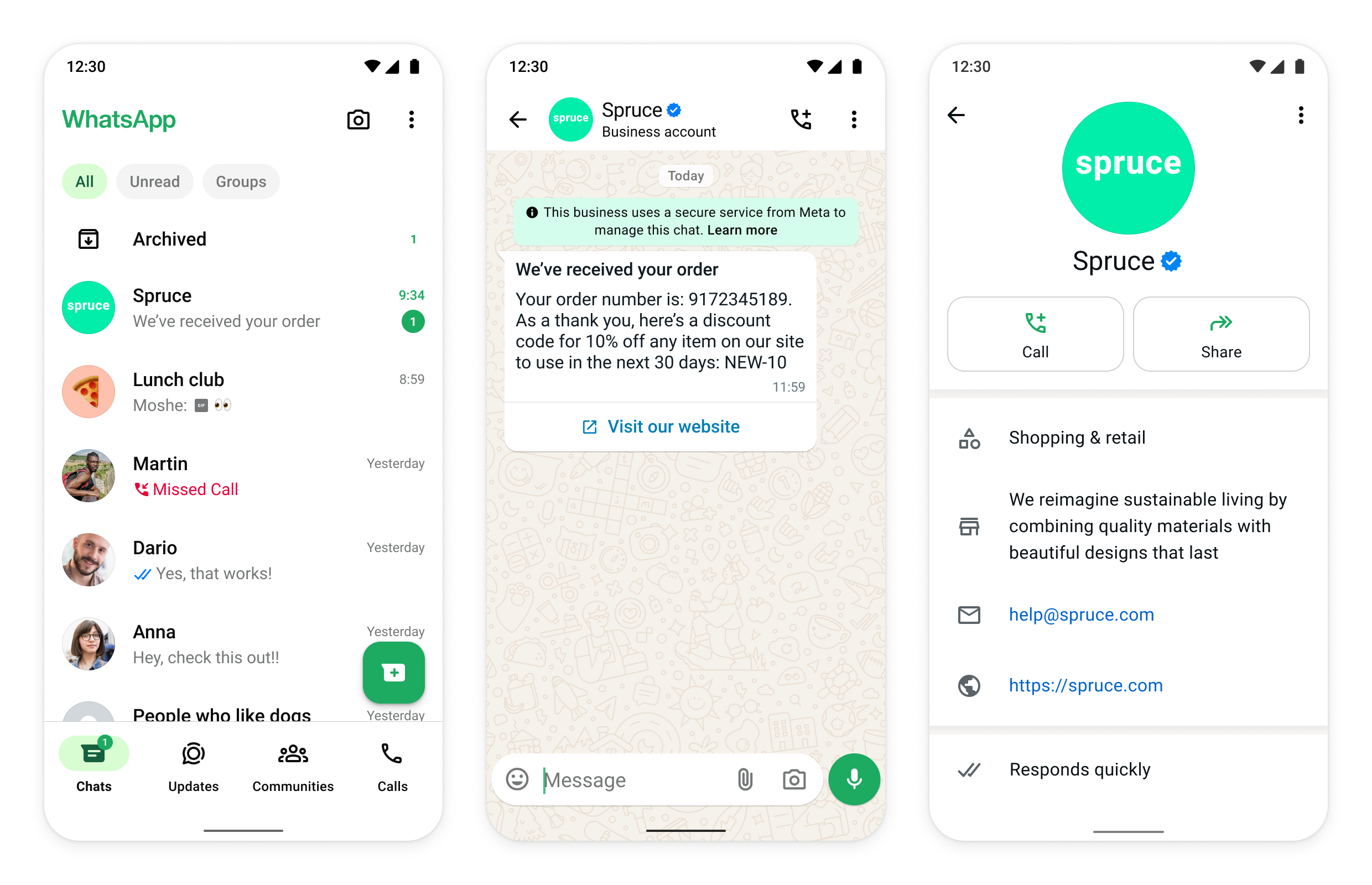
An **Official Business Account (OBA)** is a special type of WhatsApp business account given to **authentic and well-known brands**.
When a business phone number receives OBA status:
* A **blue checkmark** appears next to the business name
* Customers see the **business name instead of a phone number**
* The account looks **official and trustworthy**
This status is granted by **Meta** after reviewing the business and its public presence.
#### Read this first (important)
{% hint style="info" %}
You do **not** need OBA to use WhatsApp Business or WhatsApp APIs.
{% endhint %}
Most businesses:
* Do not have OBA
* Work completely fine without it
* Use WhatsApp for messaging, automation, and campaigns successfully
Think of OBA as a **trust badge**, not a requirement.
#### What does the blue checkmark actually mean?
The blue checkmark means:
* WhatsApp has verified that the business is **authentic**
* The brand is **well-known and frequently searched**
* The account is not impersonating another brand
It does **not** mean:
* Better message delivery
* More messaging features
* Higher limits or priority support
Your WhatsApp functionality stays **exactly the same** with or without OBA.
#### How is OBA different from a regular business account?
Most WhatsApp business numbers are verified but not official. With an Official Business Account:
* A blue checkmark is visible when a user receives a message from that number
* Your business name can become searchable in WhatsApp **after a customer has already interacted with you**
For example, if a user has previously received a message from your business, they can type your display name in the WhatsApp search bar and your chat will appear.
#### Why does WhatsApp offer OBA?
WhatsApp introduced OBA to:
* Protect users from fake or impersonation accounts
* Help users quickly identify trusted brands
* Highlight businesses with strong public recognition
OBA approval is based on **brand notability**, not on API spend or platform usage.
#### Important things to understand about OBA
Before applying (see the full [eligibility criteria](/meta-business-setup/official-business-accounts-blue-badge/eligibility-criteria-for-blue-badge.md) and [application steps](/meta-business-setup/official-business-accounts-blue-badge/how-to-apply-for-an-blue-badge.md)), keep these in mind:
* OBA is approved **per phone number**
* Approval for one number does not guarantee approval for others
* OBA decisions do not affect account functionality
An Official Business Account is WhatsApp's highest level of brand verification. It improves trust and visibility, but it's optional. If your brand qualifies, OBA is a great addition. If it doesn't, you can still use WhatsApp fully and successfully.
#### Key takeaways
* OBA = blue checkmark + trust
* OBA is optional, not a requirement
* Most businesses don't need it
* Features are identical with or without OBA
* OBA is meant for well-known, notable brands
#### FAQs
**Do I need OBA to send messages or use the WhatsApp API?**\
No. OBA is purely a trust badge. All messaging, automation, and API features work the same with or without it.
**Does getting OBA improve my message delivery or limits?**\
No. OBA has no effect on delivery rates, quality rating, or messaging limits — it only adds a blue checkmark and searchable business name.
**Who decides if a business gets OBA?**\
Meta reviews the business and its public presence, and grants OBA based on brand notability and compliance, not on how much you spend or how you use the platform.
**If one of my numbers has OBA, will my other numbers get it automatically?**\
No. OBA is approved per phone number, so each number needs its own approval.
#### Related topics
* [Eligibility criteria for blue badge](/meta-business-setup/official-business-accounts-blue-badge/eligibility-criteria-for-blue-badge.md)
* [How to apply for an blue badge](/meta-business-setup/official-business-accounts-blue-badge/how-to-apply-for-an-blue-badge.md)
* [What if your OBA request is rejected?](/meta-business-setup/official-business-accounts-blue-badge/what-if-your-oba-request-is-rejected.md)
---
# Agent Instructions
This documentation is published with GitBook. GitBook is the documentation platform designed so that both humans and AI agents can read, navigate, and reason over technical content effectively. Learn more at gitbook.com.
## Querying This Documentation
If you need additional information that is not directly available in this page, you can query the documentation by asking a question.
Perform an HTTP GET request on the following URL with the `ask` and `goal` query parameters:
```
GET https://learn.doubletick.io/meta-business-setup/official-business-accounts-blue-badge/oba-guide.md?ask=&goal=
```
`ask` is the immediate question: it should be specific, self-contained, and written in natural language.
`goal` is what the user is ultimately trying to achieve, the reason they need the answer. Sharing it helps GitBook give you a better, more relevant answer. A goal is most helpful when it describes the outcome the user wants rather than restating the question. For example, with `ask=how do I create an API token`, a goal like `automate deployments from our CI pipeline` lets GitBook tailor the answer to that use case.
The response will contain a direct answer to the question and relevant excerpts and sources from the documentation.
Use this mechanism when the answer is not explicitly present in the current page, you need clarification or additional context, or you want to retrieve related documentation sections.