> For the complete documentation index, see [llms.txt](https://learn.doubletick.io/llms.txt). Markdown versions of documentation pages are available by appending `.md` to page URLs; this page is available as [Markdown](https://learn.doubletick.io/meta-business-setup/official-business-accounts-blue-badge/what-if-your-oba-request-is-rejected.md).
# What if your OBA request is rejected?
Learn why Official Business Account (OBA) requests get rejected, whether you can appeal, and what to do next if yours doesn't get approved.
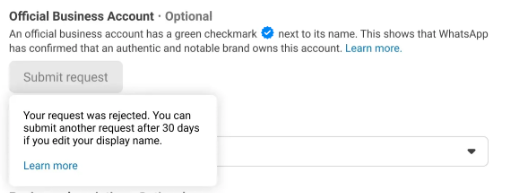
If your OBA request gets rejected, there's no need to worry. This is very common and doesn't affect your WhatsApp account in any negative way. This guide explains why rejections happen and what to do next.
#### What's covered
* [What does OBA rejection mean?](#what-does-oba-rejection-mean)
* [Common reasons why OBA requests get rejected](#common-reasons-why-oba-requests-get-rejected)
* [Can you appeal an OBA rejection?](#can-you-appeal-an-oba-rejection)
* [When can you reapply for OBA?](#when-can-you-reapply-for-oba)
* [What should you do after rejection?](#what-should-you-do-after-rejection)
* [Important things to remember](#important-things-to-remember)
#### What does OBA rejection mean?
OBA approval is strict and is mainly based on brand notability. Many genuine businesses are rejected even when everything is set up correctly. An OBA rejection simply means that, at this time, your business doesn't meet WhatsApp's criteria for OBA status.
{% hint style="info" %}
It does **not** mean your business is unverified, your WhatsApp account has an issue, or your number is restricted or blocked. Your WhatsApp setup continues to work normally.
{% endhint %}
#### Common reasons why OBA requests get rejected
**1. Brand not considered notable enough**\
WhatsApp grants OBA only to well-known and frequently searched brands. If your brand has limited media coverage, is known only locally, or is new or still growing, rejection is normal.
**2. Submitted links are not acceptable**\
WhatsApp reviews only organic, editorial coverage. Requests may be rejected if links include paid or sponsored PR articles, advertisements, app or business listings, or self-published blog posts. See the [full list of accepted vs rejected link types](/meta-business-setup/official-business-accounts-blue-badge/how-to-apply-for-an-blue-badge.md) when applying.
**3. Display name not strong enough**\
OBA is evaluated at the display name level. If the display name is generic or is changed frequently, it may fail the notability review. For example, a display name like "Customer Support" or "Best Services Pvt Ltd" may be considered too generic, whereas a clear brand identity like "Tata 1mg" or "Zomato" is more likely to meet notability expectations.
**4. Sub-brand without parent brand context**\
If you apply using only a sub-brand name that isn't widely recognized, the request may be rejected. In such cases, WhatsApp may expect a format like **{Sub-brand name} by {Notable parent brand}** — only if the parent brand is genuinely well-known.
#### Can you appeal an OBA rejection?
No. Currently, OBA rejection decisions cannot be appealed. There's no manual override or escalation — this is a standard META policy.
#### When can you reapply for OBA?
You can submit a new OBA request after **30 days**. This waiting period allows time to improve brand visibility, strengthen media presence, and correct issues from the previous application.
#### What should you do after rejection?
If your OBA request is rejected, you can continue using WhatsApp normally without any functional limitations. You can still send and receive messages, use templates, run automation and campaigns, and communicate with customers at scale. If OBA is important for your business, focus on building brand notability through organic media coverage, reputed publications, and greater public recognition before reapplying. You can also continue to update your business profile, including your profile picture, business description, website, and email address, which will remain visible to users.
#### Important things to remember
* OBA is optional
* Rejection is normal
* Approval is not guaranteed, even on reapplication
* Not having OBA does not reduce WhatsApp functionality
An OBA rejection doesn't impact your WhatsApp usage in any way. If your brand qualifies in the future, you can always reapply. Until then, focus on using WhatsApp effectively to grow your business — OBA is an added trust badge, not a requirement.
#### Key takeaways
* Rejection is common and doesn't affect your WhatsApp account's functionality
* Common causes: weak notability, unacceptable links, a generic display name, or an unrecognized sub-brand
* Rejections cannot be appealed — you must wait 30 days before reapplying
* Use the waiting period to build genuine media coverage before reapplying
#### FAQs
**Can I appeal a rejected OBA request?**\
No. OBA rejections cannot be appealed or escalated. You'll need to wait and reapply instead.
**How soon can I reapply after a rejection?**\
You can submit a new request after 30 days.
**Does a rejected OBA request affect my number's messaging ability?**\
No. Your number continues to send and receive messages, use templates, and run campaigns exactly as before.
**Will using a generic display name like "Customer Support" hurt my chances?**\
Yes, generic names are less likely to pass the notability review. A distinct, recognizable brand name performs better.
#### Related topics
* [OBA guide](/meta-business-setup/official-business-accounts-blue-badge/oba-guide.md)
* [Eligibility criteria for blue badge](/meta-business-setup/official-business-accounts-blue-badge/eligibility-criteria-for-blue-badge.md)
* [How to apply for an blue badge](/meta-business-setup/official-business-accounts-blue-badge/how-to-apply-for-an-blue-badge.md)
---
# Agent Instructions
This documentation is published with GitBook. GitBook is the documentation platform designed so that both humans and AI agents can read, navigate, and reason over technical content effectively. Learn more at gitbook.com.
## Querying This Documentation
If you need additional information that is not directly available in this page, you can query the documentation by asking a question.
Perform an HTTP GET request on the following URL with the `ask` and `goal` query parameters:
```
GET https://learn.doubletick.io/meta-business-setup/official-business-accounts-blue-badge/what-if-your-oba-request-is-rejected.md?ask=&goal=
```
`ask` is the immediate question: it should be specific, self-contained, and written in natural language.
`goal` is what the user is ultimately trying to achieve, the reason they need the answer. Sharing it helps GitBook give you a better, more relevant answer. A goal is most helpful when it describes the outcome the user wants rather than restating the question. For example, with `ask=how do I create an API token`, a goal like `automate deployments from our CI pipeline` lets GitBook tailor the answer to that use case.
The response will contain a direct answer to the question and relevant excerpts and sources from the documentation.
Use this mechanism when the answer is not explicitly present in the current page, you need clarification or additional context, or you want to retrieve related documentation sections.